
When I’m creating a marketing video with Runway, I start with what I already have: the actual product photo. From there, I use Runway to create several short shots around that product, then put the strongest clips together into an advertisement.
In this tutorial, I’ll show you exactly how I approach it.
For the example, I’ll pretend I’m advertising a skincare serum. You can replace the serum with a perfume, shoe, watch, food product, phone, clothing item, or almost anything else.
Among all the video generation tools that I have used, Runway is one of the outstanding ones, you just need to know the right prompt. Think of a prompt as a creative brief. Instead of giving vague instructions, you’re telling the AI exactly what the camera should see, how it should move, what the lighting should look like, and what mood the final video should convey.
In this tutorial, you’ll learn how to structure effective Runway prompts specifically for marketing and commercial advertisements, along with examples you can customize for your own products.
Before opening Runway, I prepare the product photo
The image I upload matters. If my product photo is blurry, poorly lit, or partially hidden, I don’t expect Runway to magically fix everything. I prefer a clear image where the entire product is visible. For this example, let’s say I have a clean photograph of a skincare serum bottle on a plain background. I keep that original image because I want Runway to use my actual product, rather than generating a similar-looking bottle.That’s an important distinction when creating an advertisement for a real business.
Why Marketing Prompts Need More Detail
Commercial videos aren’t just about showing a product, they’re about selling a feeling. A luxury watch isn’t simply photographed; it’s presented with elegant lighting, slow cinematic motion, and premium materials that suggest quality and exclusivity.Runway performs best when your prompt includes those details.Compare these two prompts:
❌ Wrong Prompt
A watch on a table.
Better Prompt
A luxury stainless steel wristwatch resting on a polished black marble surface, dramatic studio lighting, slow cinematic camera orbit, shallow depth of field, premium commercial style, ultra-realistic, 4K.
The second prompt gives Runway clear creative direction, resulting in a far more polished video.
The Formula for High-Quality Marketing Prompts
Here is a reliable structure :
Subject + Environment + Camera Movement + Lighting + Mood + Style + Quality
Example:
Premium wireless headphones displayed on a modern minimalist desk, slow rotating camera movement, soft studio lighting, luxury commercial aesthetic, realistic reflections, shallow depth of field, ultra-realistic, 4K.
Once you understand this framework, you can create prompts for almost any product.
Example 1: Luxury Perfume Advertisement
Prompt
Close-up of an elegant crystal perfume bottle on glossy black marble, surrounded by soft drifting smoke and golden light reflections. Slow cinematic camera orbit with macro lens, luxury fashion commercial, dramatic studio lighting, premium aesthetic, ultra-realistic, shallow depth of field, 4K.
Words That Instantly Improve Your Prompts
Camera Angles
- Close-up
- Extreme close-up
- Wide shot
- Macro shot
- Low-angle shot
- Overhead shot
- Drone shot
Camera Movement
- Slow orbit
- Tracking shot
- Dolly in
- Dolly out
- Smooth pan
- Push-in
- Crane shot
- Handheld documentary style
Lighting
- Golden hour
- Studio lighting
- Neon lighting
- Soft natural light
- Dramatic shadows
- Backlighting
- Volumetric lighting
- High-contrast lighting
Commercial Styles
- Luxury advertisement
- Premium product commercial
- Minimalist branding
- CinematicEditorial photography
- Fashion campaign
- Apple-style product launch
- High-end commercial
Quality Keywords
- Ultra-realistic
- Photorealistic
- Hyper detailed
- Shallow depth of field
- Professional color grading
- HDR
- 4K
- Cinematic composition
Turn Your Product Photo into a Cinematic Advertisement
One of Runway’s most powerful features that I love is the ability to animate an existing product image. Instead of creating a product from scratch, you upload a high-quality photo of your own item and use a prompt to tell the AI how the scene should come to life.
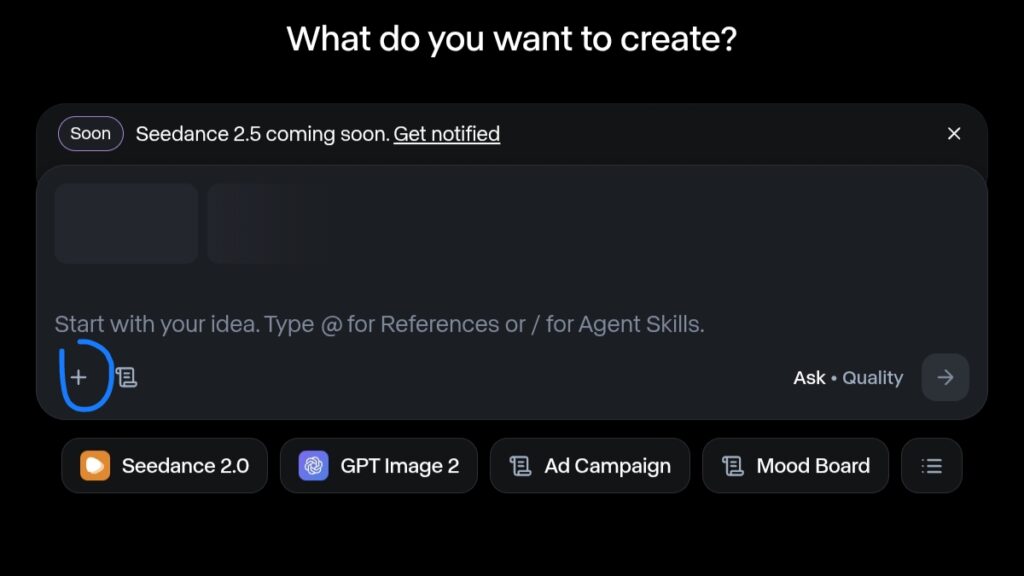
For the best results, I have to always upload a sharp, well-lit image with a clean background. The AI can then add realistic camera movement, lighting effects, and environmental details while keeping your product as the main focus.
Example: Luxury Perfume Bottle
Upload: A high-resolution photo of your perfume bottle.
Prompt:
Animate the uploaded perfume bottle while preserving its exact design, shape, logo, colors, and label. Place it on a polished black marble surface with elegant golden reflections and subtle drifting smoke. Add a slow cinematic orbit camera movement, realistic glass reflections, soft luxury studio lighting, shallow depth of field, premium fragrance commercial aesthetic, ultra-realistic, 4K. Do not modify the product branding or packaging.
Pro Tip: Tell Runway What Not to Change
When working with your own product images, always include instructions that protect your branding. This helps reduce unwanted alterations to logos, colors, or packaging.
A simple line like this can make a big difference:
“Preserve the exact product design, logo, label, colors, proportions, and packaging. Do not modify or replace any branding elements.”
Adding this constraint encourages the AI to animate the scene around your product rather than redesigning the product itself, which is especially important for e-commerce, client work, and branded marketing campaigns.
What I Do When Runway Changes My Product
This is one of the things I would watch most closely when creating an actual advertisement. AI video generation can sometimes alter details of a product.For example, my bottle might suddenly have: a different label, a slightly different shape, strange lettering, an extra cap, distorted edges, an incorrect logo, If that happens, I don’t just keep generating the same prompt and hope for a miracle.I simplify the instructions.
Revised prompt
Use the uploaded product image as the exact visual reference. Preserve the original bottle shape, cap, label, logo, colors, proportions, and packaging. Do not redesign or replace any part of the product. Only animate the camera movement and surrounding environment. Slow cinematic push-in, realistic lighting, stable product appearance.Read: how to use runway for video editing

I enjoy building for the web, exploring new technologies, and finding practical ways to use AI and modern tools to solve problems and make everyday work more efficient. My interests span web development, artificial intelligence, software, digital tools, and the many ideas shaping the future of technology.
Through this blog, I share what I learn, build, discover, and experience along the way. My goal is to make technology easier to understand, share useful insights, and document practical knowledge that can help other developers, creators, and tech enthusiasts.
Technology is constantly changing, and I believe the best way to keep up is to stay curious, keep experimenting, and never stop learning.
- How to Automatically Deliver a PDF After Successful Payment – September 17, 2026
- Why a Payment Gateway Can Say “Successful” While Your Website Shows “Failed” – September 17, 2026
- How to Build Subscription-Based Websites Without Developing an App. – August 21, 2026
Leave a Reply