I Stopped Asking Claude to “Write Code” Here’s How I Actually Use It for Programming
I used to think the best way to use an AI coding assistant was to describe an application and ask it to build the whole thing.That sounds impressive until you actually try it.
You get hundreds of lines of code, several files, a few assumptions you never asked for, and eventually an error that takes almost as long to understand as it would have taken to write the original code yourself.
I’ve found a more useful approach: give Claude a specific programming problem and make it work through the problem with me.
That could mean explaining an unfamiliar function, finding the cause of an error, reviewing code before I commit it, writing a test, or turning a repetitive task into a small script.
That’s what this guide is about.Not a list of Claude’s features. Not another article telling you that AI is “revolutionizing software development.”
Instead, I’ll show you practical ways I would use Claude while coding, including prompts you can adapt to your own projects.
Start With the Problem, Not the Code
One mistake I see with AI coding tools is jumping straight to:
“Write me a Python application that does X.”
That’s a very broad request.
Before asking Claude for code, I prefer to define the problem in plain language.
For example, suppose I need to process a CSV file containing customer information.
Instead of: Write a Python CSV processor.
I’d give Claude something closer to this: I have a CSV file containing customer records. The columns are:name, email, country, signup_date
I need to:
1. Remove duplicate email addresses.
2. Ignore rows where the email is missing.
3. Convert signup_date to YYYY-MM-DD.
4. Sort the records by signup_date.
5. Save the cleaned data as customers_clean.csv.
Use Python and pandas.Before writing the code, explain your approach and mention anythingthat could cause problems with the input data.There’s a useful difference here.
I’m not asking Claude to guess what I want. I’m giving it the input, expected behavior, technology, and constraints. That generally produces a much more useful starting point.
Use Claude as a Debugging Partner
This is one of the situations where I find an AI assistant particularly useful. When code fails, beginners often paste the error into a search engine and start opening ten different tabs.
I can instead give Claude the relevant code, the exact error, and what I expected the program to do.
For example: I’m working with Python. This is the function:
def calculate_total(items):
    total = 0
    for item in items:
        total += item["price"] * item["quantity"]
    return total
The program sometimes crashes with:

TypeError: unsupported operand type(s) for *: 'NoneType' and 'int'

Don't immediately rewrite the function.

First:
1. Explain exactly what the error means.
2. Identify which value could be None.
3. Show me how I can verify your assumption.
4. Then suggest the smallest reasonable fix.
I deliberately asked Claude not to rewrite everything.
That’s important. If I ask for a complete rewrite every time something breaks, I may get a working-looking solution without understanding what caused the problem.
A better debugging conversation is: error → diagnosis → verification → fix.
That makes Claude more useful as a programming assistant and less like a vending machine for code.
Give Claude the Error, Not Your Interpretation of the Error
This is a small habit that can make a big difference.
Suppose I tell Claude:
My API isn’t working because the authentication is broken.
I’ve already made an assumption. Instead, I’d provide:
Request:
POST /api/orders

Response:
401 Unauthorized

Response body:
{
  "error": "invalid_token"
}

The request works when I test the endpoint without the authentication
middleware.

Here is the relevant authentication code:
[paste code]

What are the most likely causes?

Rank them from most likely to least likely, and tell me what I should
check before changing the code.
Now Claude has something concrete to investigate. I’m also asking it to rank possibilities instead of pretending it knows the answer immediately.
That’s a useful pattern for debugging almost anything.
Ask Claude to Review Code Before You Improve It
Sometimes code works perfectly well but is unnecessarily complicated.
This is where I’d use Claude as a second pair of eyes.
Suppose I have a JavaScript function that has grown much larger than I originally intended.
I’d paste it and use a prompt like this:
Review this JavaScript function as a code reviewer.

Do not rewrite it yet.

I want you to identify:

- unnecessary complexity
- repeated logic
- confusing variable names
- possible edge cases
- performance concerns
- readability problems

For each issue, explain why it matters.
For each issue, explain why it matters.

Separate genuine problems from personal style preferences.
That last instruction is important. Not every difference in coding style is a problem.
If Claude suggests changing something simply because it prefers another style, I can ignore it.
After the review, I can ask:
Now refactor only the three issues you identified as genuine problems.

Keep the function's current behavior unchanged.

Show the original and revised versions and explain each change.
That gives me considerably more control than simply saying: “Make this code better.”
One of My Favorite Uses: Making Code Easier to Understand
Not every coding problem requires new code. Sometimes I inherit code I didn’t write.
Maybe it’s a function from an old project. Maybe it’s something copied from an internal repository. Maybe the original developer left six months ago.Instead of staring at it for an hour, I can ask Claude to walk me through it.
For example:
Explain this Python function to me.

Assume I understand basic Python but haven't seen this project before.

Explain:

1. What the function is trying to accomplish.
2. What each important variable represents.
3. What the inputs and outputs are.
4. Which other functions it depends on.
5. Any assumptions it makes.
6. What could cause it to fail.

Do not rewrite the code yet.
This is much more useful than asking: “Explain this code.” The more specific the questions are, the more useful the explanation becomes.
Use Claude to Write Tests, Not Just Features
Writing the feature is usually the exciting part. Writing all the tests afterward?
Not so much. That’s another area where I can delegate some of the repetitive work.
Write pytest tests for this function.

Before writing them, identify the important cases we should test.

Include:
- normal input
- zero discount
- 100% discount
- decimal prices
- invalid percentages
- negative values

For each test, explain what behavior it protects.
Notice that I’m asking for the test cases first. That gives me an opportunity to decide whether the assumptions are correct before Claude generates a pile of tests.
A Practical Prompt for Code Review
Here’s a prompt I would keep around:
Act as a careful code reviewer.

Review the code below, but don't rewrite it immediately.

Look specifically for:

1. Bugs
2. Security risks
3. Incorrect assumptions
4. Edge cases
5. Unnecessary complexity
6. Performance problems
7. Maintainability issues
For every issue:
- quote or identify the relevant section
- explain the problem
- explain the possible consequence
- rate its severity as low, medium, or high
- suggest a fix

Do not report purely stylistic preferences as bugs.

After the review, give me a short list of the changes that are actually
worth making.

Here is the code:

[PASTE CODE]
I like this format because it forces the review to be structured. More importantly, it separates “this is broken” from “I would personally write it differently.” Those aren’t the same thing.
When I Wouldn’t Trust Claude’s Answer Immediately
There are some situations where I would treat Claude’s response as a starting point rather than an answer.
Security
If Claude suggests an authentication, authorization, encryption, payment, or data-protection implementation, I’d verify it carefully.
A response can look professional and still contain a serious security mistake.
APIs and Libraries
If I’m working with a library that changes frequently, I’d check the current official documentation rather than assuming Claude’s example is based on the newest version.
Production Architecture
I wouldn’t let an AI assistant make major architectural decisions without understanding the application’s actual requirements.
Generated Dependencies
If Claude tells me to install a package, I want to know why I need it and whether the project actually benefits from adding another dependency.
Database Changes
I’d be especially careful with migrations, destructive queries, and changes to production data.
The rule I use is simple:
The more expensive the mistake, the more verification I do.
Claude Isn’t a Replacement for Documentation
This is worth emphasizing because AI can make developers overconfident.
If I’m trying to understand a concept, Claude can be fantastic. If I want to know the exact current behavior of an API, I still want the official documentation.
For Python, for example, I’d use the official Python documentation to verify language and library behavior. The same principle applies to frameworks and third-party services.
My preferred workflow is often: Claude for explanation → official documentation for verification → my own tests for confirmation. That three-step process is much safer than blindly copying an AI response.
Three Prompts I Would Actually Keep
1. Debugging prompt
Here is the error I'm getting:

[ERROR]

Here is the relevant code:

[CODE]

My expected behavior is:

[EXPECTED RESULT]

Don't rewrite everything.
First explain the likely cause, then tell me how to verify it,
and finally suggest the smallest reasonable fix.
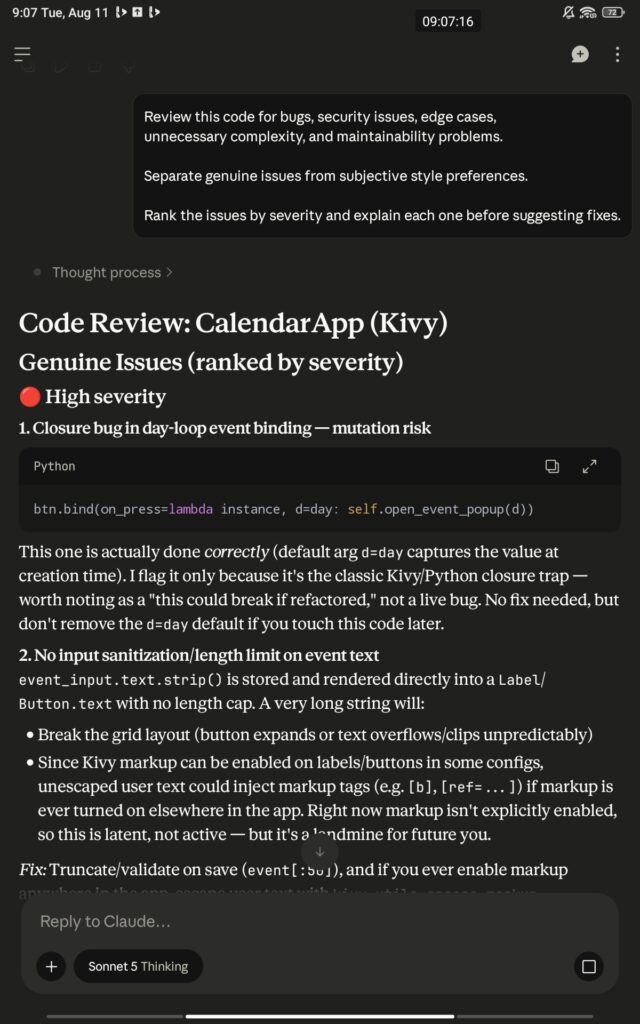
2. Code review prompt
Review this code for bugs, security issues, edge cases,
unnecessary complexity, and maintainability problems.

Separate genuine issues from subjective style preferences.

Rank the issues by severity and explain each one before suggesting fixes.

[CODE]
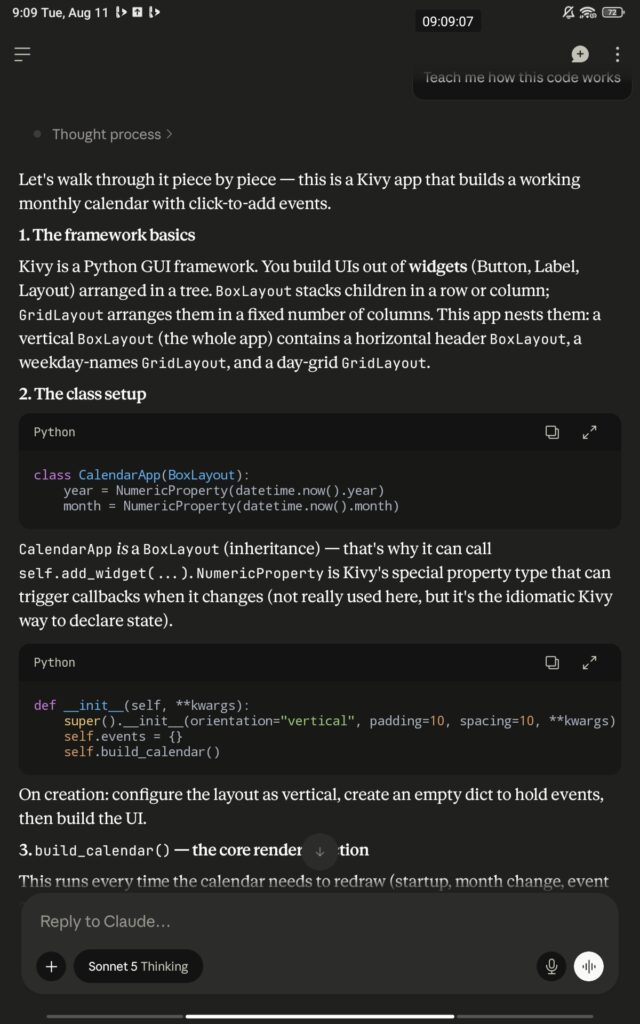
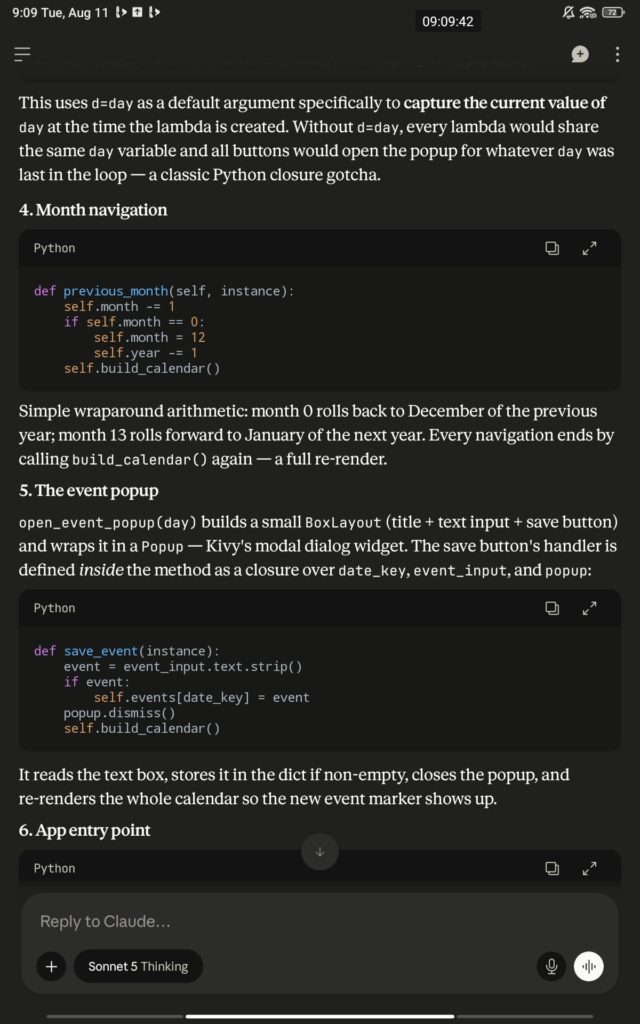
3. Learning prompt
Teach me how this code works.

Assume I understand the basics but haven't worked with this pattern before.

Start with the big picture, then walk through the important sections.

After explaining it, give me two small exercises I can complete
without copying the original solution.

[CODE]
The third one is particularly useful if you’re learning. There’s a difference between getting Claude to solve a programming problem and using Claude to become better at solving programming problems yourself.
So, Is Claude Actually Useful for Coding?
Yes, but I wouldn’t measure its usefulness by how many lines of code it can generate. That’s the wrong measurement.
I’d judge it by how much unnecessary work it removes from my development process. If I’m stuck understanding an unfamiliar function, Claude can help me break it down.
When staring at a confusing traceback, it can help me investigate it. If I’ve written repetitive code, it can suggest a cleaner approach.
If I need tests or documentation, it can give me a strong first draft.And when I want another opinion on code I’ve written, it can act as a useful reviewer.
But I still need to run the code, read the documentation, think about security, and decide whether the proposed solution actually belongs in the project. That’s the practical way to use Claude for coding.
Can
Frequently Asked Questions (FAQ)
Is Claude good for coding?
Yes. Claude is highly capable of writing code, debugging issues, explaining programming concepts, reviewing code, generating documentation, and assisting with software development. However, developers should always test and review AI-generated code before using it in production.
Which programming languages does Claude support?
Claude supports popular languages including Python, JavaScript, TypeScript, Java, C++, C#, Go, Rust, PHP, Ruby, Swift, Kotlin, SQL, HTML, and CSS, along with many modern frameworks.
Can Claude debug code?
Yes. Claude can analyze error messages, stack traces, configuration files, and source code to identify possible issues and explain why they occur, often suggesting practical fixes.
Is Claude better than ChatGPT for coding?
Both are strong AI coding assistants with different strengths. Claude is often praised for handling long codebases and providing detailed explanations, while ChatGPT offers broad ecosystem support and coding capabilities. The best choice depends on your workflow and preferences.
Can beginners use Claude to learn programming?
Absolutely. Claude can explain concepts in simple language, generate examples, create practice exercises, and answer follow-up questions, making it a useful learning companion for new programmers.
I’m a web developer, technology enthusiast, and lifelong learner with a strong interest in AI, web technologies, and the ever-evolving digital world.
I enjoy building for the web, exploring new technologies, and finding practical ways to use AI and modern tools to solve problems and make everyday work more efficient. My interests span web development, artificial intelligence, software, digital tools, and the many ideas shaping the future of technology.
Through this blog, I share what I learn, build, discover, and experience along the way. My goal is to make technology easier to understand, share useful insights, and document practical knowledge that can help other developers, creators, and tech enthusiasts.
Technology is constantly changing, and I believe the best way to keep up is to stay curious, keep experimenting, and never stop learning.
[…] Claude Code: Anthropic’s command-line agent for multi-file refactoring, Git management, and running terminal workflows. Check Cloude for coding. […]



Leave a Reply